What “editable PPTX” actually means: image slides, OCR layers, and native objects
On this page
An exported file can open in PowerPoint and still be almost impossible to edit. That is not a file-format bug. A .pptx is a container, and video-to-PowerPoint tools can put very different things inside it.
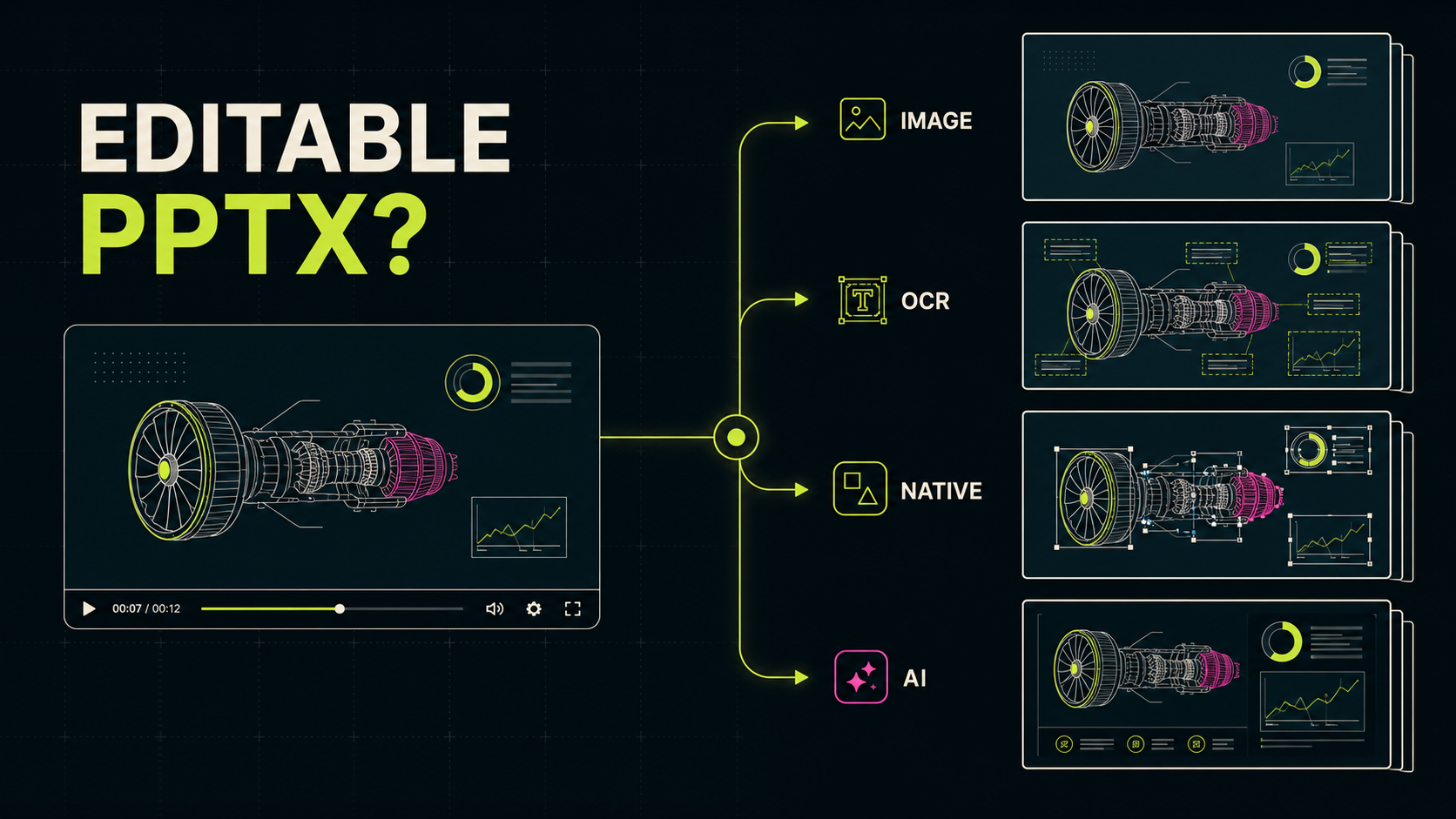
The phrase “editable PowerPoint” is commonly used for image-backed slides, OCR text layers, reconstructed PowerPoint objects, and entirely new AI-generated decks. All four can be useful. They are not the same output.
The short answer
| Output model | What you can edit | Main tradeoff |
|---|---|---|
| Image-backed slide | Order, crop, size, and annotations | High visual fidelity; text and diagrams remain pixels |
| Image plus OCR text | Detected text, search, and copy | OCR errors and font mismatch |
| Native reconstruction | Rebuilt text boxes, shapes, tables, or charts | More inference can mean less fidelity |
| AI-generated deck | New transcript-derived slide objects | It does not recover the original presentation |
Model 1: one image per slide
The simplest recovery pipeline detects a visual change, captures a frame, and places that frame on a PowerPoint slide. You can reorder, crop, resize, or annotate the captured image. You cannot directly edit the text, chart data, icons, shapes, or original animation sequence inside the screenshot.
The advantage is fidelity: a clean capture looks like the recording. This is often enough for lecture handouts, review decks, archives, and visual notes. The precise label is image-backed PPTX, not a fully reconstructed source deck.
Model 2: image background plus OCR text layer
This model keeps the captured image as the visual source and adds text boxes from optical character recognition. The result behaves somewhat like a searchable PDF: the image carries the appearance while the text layer makes detected words selectable, searchable, and replaceable.
Charts, icons, complex diagrams, and missed text remain part of the image. Small type, equations, compression, unusual fonts, or content covered by a presenter can all reduce OCR quality. “OCR text layer” is therefore more informative than “perfectly editable.”
Model 3: native PowerPoint reconstruction
The most ambitious workflow tries to rebuild text boxes, shapes, tables, charts, images, and layout relationships as native PowerPoint objects. It provides more control after export, but it is not ordinary format conversion. The software has to infer structure from rendered pixels.
A screenshot does not reveal whether a rectangle was a PowerPoint shape, part of an SVG, a chart element, or a background layer. Video also loses font files, chart data, slide masters, object names, speaker notes, and animation timelines. Reconstruction should be evaluated for both editability and visual fidelity.
A fourth workflow: generating a new deck
Some tools transcribe or summarize the recording and generate a new presentation. That can be useful for a talking-head video, podcast, or meeting without visible slides. It is a different job from recovering the slides that appeared in the recording.
Do I want the slides that appeared in the recording, or a new deck about the recording?
How to inspect an exported PPTX
- Click the title. If the whole slide is selected, it is probably one image. A text cursor indicates a text object or OCR layer.
- Move one visual element. If a chart or icon cannot be selected independently, it is part of the background image.
- Search for a word. A match usually means the file contains a text layer, though it does not prove correct positioning.
- Change the theme. Native text and shapes may respond to theme fonts and colors. Screenshot content will not.
- Inspect the PPTX as a ZIP archive. A large image per slide points to an image-backed deck. Text runs, chart XML, and embedded workbooks provide stronger evidence of native objects.
What a fair converter comparison should report
- original-slide recovery versus new-deck generation;
- missed slides, duplicates, transition frames, and image resolution;
- selectable text and the actual PPTX object model;
- local, browser, server, or mixed processing;
- manual cleanup time, test date, plan, and settings.
The exported file is the evidence. A landing-page label remains a vendor claim until someone inspects the result.
Where Video2Any fits
Video2Any is an original-slide recovery workflow, and it does the first kind on this list: its PPTX places each captured frame on a slide, exactly as it appeared. It does not add an OCR text layer, and it does not claim to recover chart data, slide masters, or animation objects from video pixels. Reading text off a picture is a guess, and a guess printed over someone's lecture is worse than a picture of it.
Developers who need only the visual change detector can use the zero-dependency video-slide-extractor package and build the decoding, cleanup, OCR, and export stages around it.
Bottom line
“Editable PPTX” is not a binary property.
- Image-backed slides preserve appearance.
- OCR-layer slides add searchable and editable text.
- Native reconstruction offers more control but requires more inference.
- Generated decks solve a different problem from slide recovery.