Why video-to-PowerPoint tools miss slides (and how to test the output)
On this page
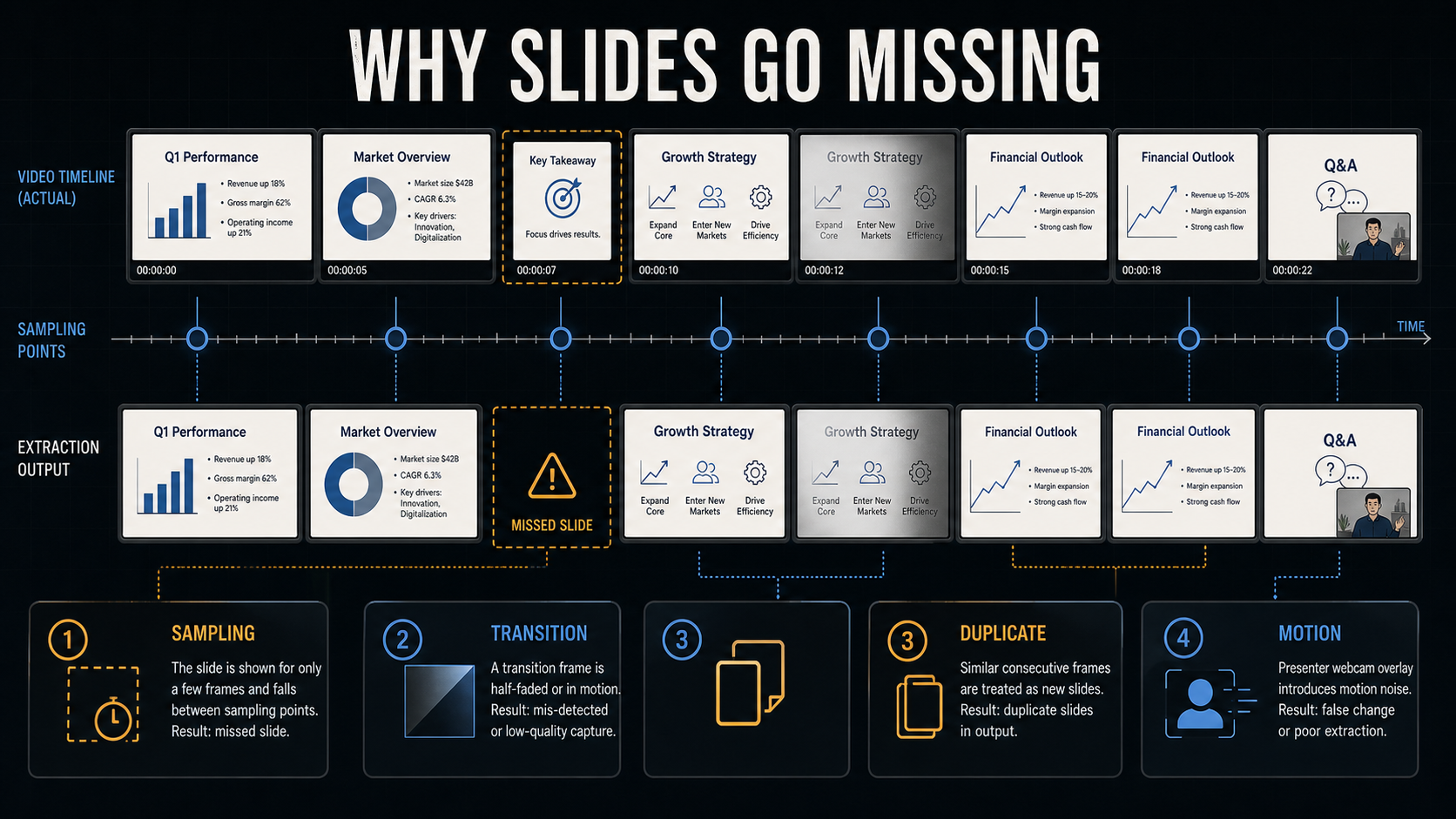
Short version: Missing slides usually come from one of five stages: sampling, change thresholds, transitions, motion, or duplicate removal. "AI accuracy" is not a useful diagnosis until you know which stage failed.
I maintain Video2Any and the open-source video-slide-extractor package. This is an implementation note, not an independent product ranking. The goal is to make the failure modes inspectable.
Start with the symptom, not the brand
| What you see | Likely stage | What to inspect first |
|---|---|---|
| A brief slide is absent | Sampling | Seconds between analyzed frames |
| One new bullet is ignored | Change threshold | Detection sensitivity and crop |
| The slide is half faded | Frame selection | Settle delay after the change |
| Cursor or webcam creates extra slides | Motion handling | Crop, mask, or motion-aware threshold |
| A revisited slide disappears | Global deduplication | Whether chronology or uniqueness is the goal |
1. Sampling creates a hard recall limit
Many extractors do not compare every decoded video frame. They inspect a time grid, for example one frame every few seconds. This is fast, but a slide shown entirely between two sample points is invisible to every later stage. Lowering a threshold cannot recover input that was never analyzed.
This is a general property of temporal resampling, not a Video2Any-only issue. The official FFmpeg documentation describes dropping or duplicating frames to reach a target frame rate. Different tools use different decoders and grids, so ask for the actual sampling interval instead of assuming they all work the same way. FFmpeg fps filter documentation
Video2Any currently chooses an automatic interval from the recording length, normally between one and six seconds, and widens it for very long files to cap memory use. The editor exposes resampling because a fast first pass and a high-recall pass are different operating points.
2. Every change threshold makes a tradeoff
A visual detector needs a rule for "different enough." A high threshold ignores compression noise and cursor movement, but it can miss a small build such as one new bullet. A low threshold catches smaller edits, but may emit a new slide whenever the presenter moves.
Video2Any downsamples frames, divides them into blocks, measures color change, and counts how many blocks changed. It can calibrate that ratio from the clip. Other systems use different measurements. PySceneDetect documents both a fixed content threshold and an adaptive detector intended to reduce false cuts during camera movement. That shows the tradeoff; it does not mean every tool uses PySceneDetect. PySceneDetect detector documentation
3. Detecting a change is not the same as choosing a clean frame
A timestamp can be correct while the image is unusable. Crossfades, wipes, and build animations create intermediate frames containing part of the old slide and part of the new one. A detector may correctly say "something changed" before the presentation has settled.
A cleanup stage can advance to a later sample or add a small capture delay. That reduces half-faded exports, but no single delay fits a hard cut, a two-second dissolve, and a long bullet animation. Count bad transition captures separately from missed timestamps.
4. Motion changes what "different" means
A webcam bubble, cursor, live code demo, animated chart, or handheld camera can change pixels without changing the slide. Cropping a stable slide region is usually the cleanest fix. When that is impossible, an activity mask can ignore blocks that move continuously.
The catch is that a mask can hide the subject in motion-dominant video. Video2Any therefore keeps a persistent-motion mask only when the remaining image still behaves like slide content. It is a mitigation, not a guarantee for every recording style.
5. Duplicate removal can erase meaningful revisits
Adjacent change detection asks whether the current frame differs from a recent one. Global deduplication asks whether it resembles any slide already kept. Those are separate questions.
If a lecturer returns to the agenda slide, a compact deck may want one copy. A chronological lecture record may need both appearances. A "duplicate" is therefore a product decision as well as a similarity score. Test the export against your intended use.
A five-minute audit before processing the full recording
- Pick a two- to five-minute segment containing 10 to 20 real slide changes, including one transition and one small build.
- Write down each real slide's start time. This is your ground truth, even if it is only a small CSV.
- Run the extractor with a recorded version, sampling interval, threshold or sensitivity, crop, and output resolution.
- Match each detection to at most one real transition within a declared tolerance window. Do not let several detections claim the same slide.
- Report missed slides, false positives, duplicates, and unusable transition frames separately.
For comparable metrics, use precision for how many detections were real, recall for how many real changes were found, and F1 for their balance. The open-source package includes a reproducible protocol with matching rules and reporting fields. Reproducible evaluation protocol
What I would change first
- One brief page is missing: shorten the sampling interval around that section.
- Small builds are missing: increase sensitivity, then check whether cursor and compression noise create false positives.
- Many extra slides appear: crop out the webcam or moving controls before changing the global threshold.
- Frames are half faded: prefer a later settled frame; do not score timestamp detection and image quality as one metric.
- Repeated slides disappear: decide whether the output is a unique deck or a chronological record before enabling global deduplication.
Frequently asked questions
Why did a video-to-PowerPoint converter miss one slide?
The most common hard limit is sampling: if a brief slide appears entirely between two sampled timestamps, the detector never receives that frame. Thresholds can also hide small visual changes, such as one new bullet on an otherwise unchanged slide.
Will a shorter sampling interval recover every slide?
It improves the chance of seeing brief slides, but it does not guarantee a clean result. Denser sampling costs more processing and can create more transition candidates, motion noise, and duplicates for later stages to resolve.
Why does the exported PPTX contain half-faded slides?
The change may be detected while a crossfade, wipe, or build animation is still in progress. Transition detection and choosing a clean settled frame are separate problems.
Why are there duplicate slides?
A tool may treat cursor movement, a webcam overlay, or a small animation as a new slide. A presenter can also revisit an earlier slide. Global duplicate removal is a separate pipeline stage from detecting adjacent changes.
Can AI reconstruct a slide that was never sampled?
A model can generate a plausible replacement from speech or nearby frames, but that is new-deck generation rather than recovery of the original visual. It should be labeled and evaluated differently.
Bottom line
There is no honest one-number answer to "How accurate is video to PowerPoint?" until the test defines sampling, matching, duplicates, and image quality. Label a short clip, identify the failing stage, and change one setting at a time. The exported file, not the landing-page adjective, is the evidence.