Study notes that point back to each page
A note is useful when you know where it came from. Here, every page of the handout carries its own notes and the moment it appeared: 17:45 means the page was up at 17:45, and what the note records is what was said then. When a note stops making sense, you go back to that stretch of the recording and hear it again.
Sign in to run Spoken notes. The video file stays on your device; starting notes uploads the audio and, when the job has pages, the page images.
 1:34
I'll share experiences as a user of FLOSS tools for open research in social science. Specifically, I'll talk about a team project I worked on to produce and analyze a Twitter follow graph of last year's FOSDEM and Chaos Con participants.
Summary
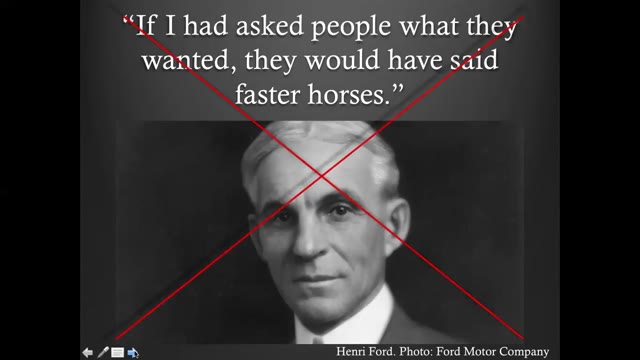
Maya introduces her talk on how free/libre and open source software (FLOSS) meets social science research, opening with the quote often attributed to Henry Ford—"If I had asked people what they wanted, they would have said faster horses"—to illustrate users' inability to convey their needs to innovators. She notes this is the opposite of how open source development and open research grow: by valuing and promoting user feedback toward community-oriented goals.
The FOSDEM 2021 demo talk (CC BY 2.0 BE): one page at its timestamp, with the note written from that stretch.
- A note per page, with its timestamp
- Reread next to the page image
- 3 free runs
How the notes stay tied to the pages
Open the recording and extract the pages
Drop the file, or use the extension when the recording only plays in a tab. Each page keeps the time it appeared.
Run Spoken notes
The handout is written per page: the transcript and, when there are pages, the page images go to the model together.
Review against the recording
Open a page, read its note, and check the timestamp when something reads wrong. The export keeps the times in the transcript and the page images in the document.
What the notes are
- The notes summarize what was said. They do not add facts the recording does not contain.
- Timestamps live on each page of the handout and in the transcript exports; the deck export puts the notes into the speaker notes.
- Sign-in is required.
Pricing
- Spoken notes cost $0.01 per started audio minute, charged only when the run finishes.
- 3 free completed runs per account, each up to 30 minutes and 60 pages.
- Monthly $9.99 with $10 of credit a month; one-year pass $29; Lifetime $49. Prices include tax.
Questions
- How is this different from the general notes page?
- /video-to-notes describes the whole feature; this page is about one property of it: the notes are tied to pages. If you want a linear summary without page anchors, the same run exports that too.
- What do I do with the time on each page?
- Every page keeps the moment it appeared. The transcript export carries [mm:ss] marks or .srt cues, so you can search the recording for the stretch a note refers to.
- Are the notes written from the page images?
- From the transcript, and from the page images when the job has pages. The images go to the model together with the transcript, so a note can mention what was drawn on the slide.
- What happens to a page nobody talked over?
- A page that was up in silence gets a short note or none. The handout does not pad quiet stretches.
- How much does it cost?
- $0.01 per started audio minute, charged only when the run finishes. 3 completed runs are free per account, each up to 30 minutes and 60 pages.