Notes from an Echo360 class
The class plays in Echo360, the slides live in the player, and the handout depends on both. Open the class on its own Echo360 page and let the extension pick up the pages while it plays, then run Spoken notes: the spoken part becomes one chaptered handout, with notes on each page. Export Markdown, Word or PDF.
The class only plays in Echo360? The extension captures the pages from the player while it runs.
The extension reads the pages already showing in the tab; for extraction, the Echo360 video is not uploaded. Starting notes uploads the audio and, when the job has pages, the page images.
 2:15
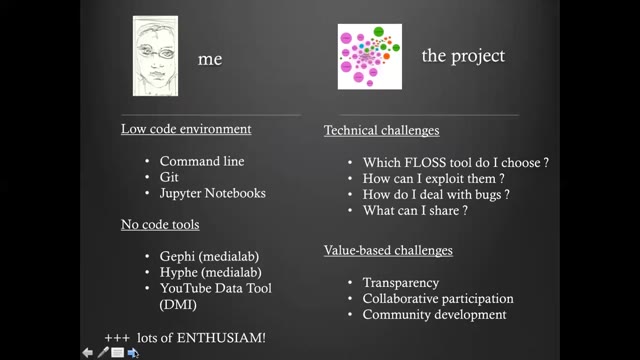
Implementing the project gave insight into what it takes for social scientists with minimal tech knowledge or exposure to open source values to practice open research with FLOSS tools. Three types of challenges are addressed: training, documenting, and collaborating. The speaker's user background: minimal experience with digital tools for research—only the basics of the terminal, version control with Git, and executing code in Jupyter notebooks, plus some no-code tools like Gephi, HIVE, and YouTube Data Tool, which they liked and were eager to do more of.
Summary
Maya introduces her talk on how free/libre and open source software (FLOSS) meets social science research, opening with the quote often attributed to Henry Ford—"If I had asked people what they wanted, they would have said faster horses"—to illustrate users' inability to convey their needs to innovators. She notes this is the opposite of how open source development and open research grow: by valuing and promoting user feedback toward community-oriented goals.
From the FOSDEM 2021 demo talk (CC BY 2.0 BE): a page with the note written from what was said while it was up.
- One chaptered handout
- Pages from the player, notes from the speech
- 3 free runs
From the class to the handout
Get the pages
Use the extension on the Echo360 player, or drop a copy of the recording you are allowed to use. The pages keep the time each one appeared.
Run Spoken notes
Sign in and start the run. The audio goes up first; the page images, when there are pages, follow for the write-up. The handout is organized by chapter.
Read and export
Study mode puts each note next to its page. Fix what the transcript garbled, then export Markdown, Word or PDF, with the transcript as .txt or .srt.
Know before you start
- Echo360 playback is read from the screen. A class locked down by the platform shows the extension nothing, and no feature here gets around that.
- Spoken notes can use the audio already playing in the Echo360 tab. A protected or silent player may block capture; then you can use a file you are allowed to process, or keep the pages without notes.
- Only run this on classes you have permission to take notes from.
Pricing
- Spoken notes cost $0.01 per started audio minute, charged only when the run finishes.
- 3 free completed runs per account, each up to 30 minutes and 60 pages.
- Monthly $9.99 with $10 of credit a month; one-year pass $29; Lifetime $49. Prices include tax.
Questions
- How is this different from the Echo360 slides page?
- /tools/echo360-to-slides ends at the deck: the pages as PPTX or PDF. This page goes one step further and writes the spoken part of the class into notes on every page.
- Where does the audio come from?
- From the audio already playing in the Echo360 tab, captured by the extension, or from a file you are allowed to process. Starting notes uploads that audio and, when there are pages, the page images. The Echo360 video file is not downloaded. A protected player may block capture.
- Does the video file get uploaded?
- No. Pages are read from the tab and stay in the browser. Starting Spoken notes uploads the audio and, when the job has pages, the page images.
- Which Echo360 view should I open?
- The standalone class page, with the slides in the large view. Embedded course players are often protected and give the extension blank frames.
- What do I get for free?
- The first 30 minutes of slide extraction on every video, and 3 completed Spoken notes runs per account, each up to 30 minutes and 60 pages.