Notes from a screen recording
A walkthrough recording has two tracks: what the demonstrator did on screen and what they said while doing it. Extract the pages the screen showed, run Spoken notes on the speech, and the tutorial becomes one handout with a note per page, ready to hand to the next person who asks how it works.
Sign in to run Spoken notes. The video file stays on your device; starting notes uploads the audio and, when the job has pages, the page images.
 1:45
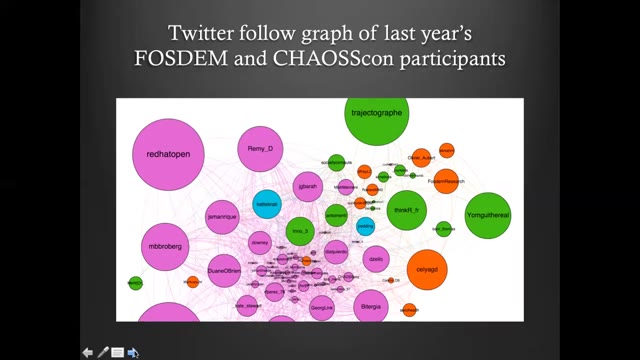
The speaker shares their experience as a user of FLOSS tools for open research in social science, focusing on a team project that produced and analyzed a Twitter follow graph of last year's FOSDEM and Chaos Con participants. The project used open source tools and agile management: data was collected with the command line tool Torque, network visualization was done with Gephi, and Framagit provided a collaborative framework for managing code, data, visualization, and text. Implementing the project led to insight about what it takes for social scientists with minimal tech knowledge or exposure to open source values to practice open research with FLOSS tools.
Summary
Maya introduces her talk on how free/libre and open source software (FLOSS) meets social science research, opening with the quote often attributed to Henry Ford—"If I had asked people what they wanted, they would have said faster horses"—to illustrate users' inability to convey their needs to innovators. She notes this is the opposite of how open source development and open research grow: by valuing and promoting user feedback toward community-oriented goals.
From the FOSDEM 2021 demo talk (CC BY 2.0 BE): a page with the note written from the stretch it was on screen.
- Pages plus what was said
- One chaptered handout
- 3 free runs
From capture to handout
Open the screen recording
Drop the file. The detector keeps a page each time the screen settles on something new, so menus that open and shut in a blink are skipped.
Check the pages
Quick UI motion is where pages get missed: a drag across two panes may never produce a page, and a tooltip may produce one. Step through, merge, delete.
Run Spoken notes
The speech becomes the handout, organized by chapter, with a note per page. Export Markdown, Word or PDF.
Where screen recordings are hard
- Fast UI motion blurs and slides past; pages that appear for a fraction of a second may not be caught.
- Tiny text in a full-screen capture stays whatever sharpness the recording has. The page image keeps the pixels it was given.
- Handout quality follows the audio. A screencast recorded with a good microphone writes better notes than one with laptop noise.
Pricing
- Spoken notes cost $0.01 per started audio minute, charged only when the run finishes.
- 3 free completed runs per account, each up to 30 minutes and 60 pages.
- Monthly $9.99 with $10 of credit a month; one-year pass $29; Lifetime $49. Prices include tax.
Questions
- Can it follow a tutorial where nothing is said?
- Pages come from the screen changes, but the notes are written from speech. A silent screencast gives you the pages and their timestamps, and a thin or empty handout.
- What about a demo with a lot of scrolling?
- Scrolling produces no new page unless the screen settles somewhere readable. Step through the detected pages after the run and keep the ones that matter.
- How is this different from the screen-recording slides page?
- /tools/screen-recording-to-ppt ends at the deck. This page adds the spoken track: one chaptered handout with notes on every page.
- Does the recording get uploaded?
- No. Pages are extracted in the browser. Starting Spoken notes uploads the audio and, when the job has pages, the page images.
- What does it cost?
- $0.01 per started audio minute, charged only when the run finishes. 3 completed runs are free per account, each up to 30 minutes and 60 pages.