录屏的讲稿
一段操作演示视频有两条线:演示的人在屏幕上做了什么,以及他做的时候说了什么。取出屏幕上出现过的页面,对讲话点「讲稿」,教程就变成一篇讲稿,一页一条,正好交给下一位来问怎么做的人。
讲稿需要登录。视频文件不上传;点「讲稿」后会上传音频,有页时还会上传页面静图。
 1:45
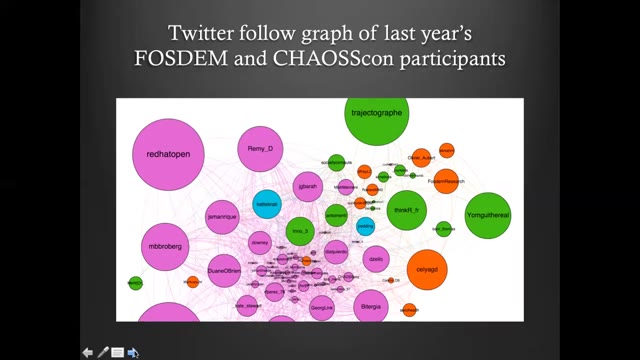
The speaker shares their experience as a user of FLOSS tools for open research in social science, focusing on a team project that produced and analyzed a Twitter follow graph of last year's FOSDEM and Chaos Con participants. The project used open source tools and agile management: data was collected with the command line tool Torque, network visualization was done with Gephi, and Framagit provided a collaborative framework for managing code, data, visualization, and text. Implementing the project led to insight about what it takes for social scientists with minimal tech knowledge or exposure to open source values to practice open research with FLOSS tools.
摘要
Maya introduces her talk on how free/libre and open source software (FLOSS) meets social science research, opening with the quote often attributed to Henry Ford—"If I had asked people what they wanted, they would have said faster horses"—to illustrate users' inability to convey their needs to innovators. She notes this is the opposite of how open source development and open research grow: by valuing and promoting user feedback toward community-oriented goals.
来自 FOSDEM 2021 演示讲座(CC BY 2.0 BE):一页,配它在屏幕上那一段写出的讲稿。
- 页面加上当时说的话
- 一篇按章节编排的讲稿
- 3 次免费
从录屏到讲稿
打开录屏
拖入文件。屏幕停在新内容上时,检测就存一页,一闪而过的菜单不会成为一页。
检查页面
界面动得快是漏页的地方:跨两个窗格的拖动可能不出页,一个悬浮提示却会出一页。逐页检查,合并,删掉多余的。
点「讲稿」
讲话的部分变成按章节编排的讲稿,一页一条。导出 Markdown、Word 或 PDF。
录屏难在哪
- 界面动得快就会糊、就滑过去;出现不到一瞬的页面可能抓不到。
- 全屏录屏里的小字,清晰度只有视频给的那样。页面图片保住的,就是当初拿到的像素。
- 讲稿质量跟着音频走。麦克风好的录屏,写出的讲稿比满屏风扇声的好。
计费
- 讲稿按音频分钟计费,每开始一分钟 $0.01,只在任务完成时扣。
- 每账号 3 次免费完成任务,每次不超过 30 分钟、60 页。
- 月订 $9.99,每月送 $10 额度;年卡 $29;买断 $49。价格已含税。
常见问题
- 全程不说话的教程能跟吗?
- 页面来自屏幕变化,但讲稿根据讲话来写。无声录屏能给你页面和时间戳,讲稿会很薄或者没有。
- 一直在滚动的演示怎么办?
- 屏幕没有停在可读的地方,滚动就不会出页。跑完后逐页检查,留下重要的那些。
- 这和录屏转 PPT 那页有什么区别?
- /tools/screen-recording-to-ppt 停在课件。这一页再加上口头那条线:一篇按章节编排、每页配讲稿的讲稿。
- 录屏会上传吗?
- 不会。页面在浏览器里提取。开始讲稿后会上传音频,有页时还会上传页面静图。
- 怎么计费?
- 按音频分钟计费,每开始一分钟 $0.01,任务完成才扣。每账号 3 次免费完成任务,每次不超过 30 分钟、60 页。