AI 노트는 로그인 후 사용할 수 있습니다. 영상 파일은 업로드하지 않습니다. 노트를 시작하면 소리와, 페이지가 있을 때는 페이지 정지 이미지가 전송됩니다.
강의 모든 페이지에 강의록
녹화를 열어 페이지를 뽑은 뒤 「강의록」을 시작하세요. 말한 내용이 장별로 하나의 강의록으로 정리되고, 페이지마다 노트도 붙습니다. 페이지는 브라우저에 남습니다. 영상 파일은 업로드하지 않습니다. 강의록을 시작하면 소리와, 페이지가 있을 때는 페이지 정지 이미지가 전송됩니다.
- 페이지마다 강의록
- 강의록과 받아적기 .txt/.srt
- 영상 3개 무료
사용법
브라우저에서 페이지 뽑기
강의, 회의, 화면 녹화를 끌어다 놓습니다. 탭에서만 재생되는 영상은 Chrome 확장 프로그램을 씁니다. 페이지는 기기에서 찾습니다.
「강의록」 시작하기
무료·유료 규칙을 확인합니다. 소리를 먼저 보내면 받아적기가 바로 시작되고, 페이지 정지 이미지는 이어서 전송되어 강의록 작성에 쓰입니다. 강의록은 장별로 정리됩니다.
확인하고 내보내기
패널에서 노트를 고치고 읽기 모드로 확인합니다. Markdown, Word, PDF(가진 페이지 이미지 포함)와 받아적기 .txt / .srt를 내보냅니다.
받게 되는 것
 4:39
The speaker uses an opening anecdote to introduce the technical and value-based challenges of being a FLOSS tools user in a social science setting. On the technical side, the first challenge is that the speaker does not know how to code. This meant they did not exploit Torque to the fullest or use its Python library programmatically, and had to rely on a third party to build the network that was eventually imported into Gephi.
요약
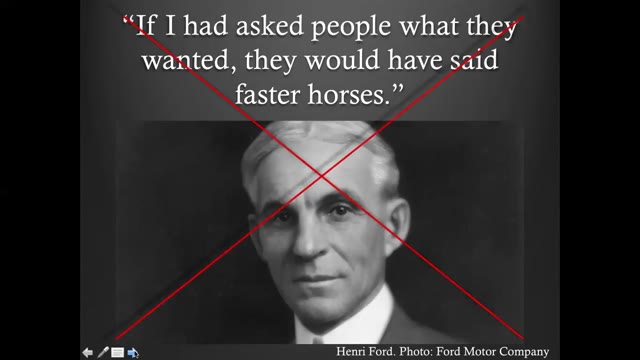
Maya introduces her talk on how free/libre and open source software (FLOSS) meets social science research, opening with the quote often attributed to Henry Ford—"If I had asked people what they wanted, they would have said faster horses"—to illustrate users' inability to convey their needs to innovators. She notes this is the opposite of how open source development and open research grow: by valuing and promoting user feedback toward community-oriented goals.
The speaker introduces herself as Maya and says she will talk about how floss meets social science research and lives to tell the tale. She begins with a quote: if people had been asked what they wanted, they would have said faster horses.
The speaker introduces herself as Maya and frames the talk around how free/libre and open source software (floss) meets social science research. She opens with the quote often attributed to Henry Ford—"If I had asked people what they wanted, they would have said faster horses"—used to illustrate users' inability to convey their needs to innovators. She notes this is the opposite of how open source development and open research grow and improve: by valuing and promoting user feedback to reach community-oriented goals.
I'll share experiences as a user of FLOSS tools for open research in social science. Specifically, I'll talk about a team project I worked on to produce and analyze a Twitter follow graph of last year's FOSDEM and Chaos Con participants.
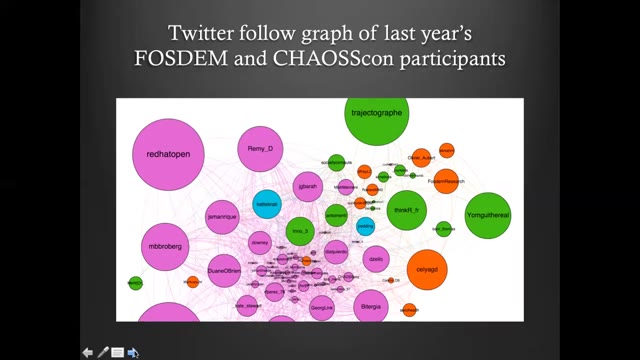
The speaker shares their experience as a user of FLOSS tools for open research in social science, focusing on a team project that produced and analyzed a Twitter follow graph of last year's FOSDEM and Chaos Con participants. The project used open source tools and agile management: data was collected with the command line tool Torque, network visualization was done with Gephi, and Framagit provided a collaborative framework for managing code, data, visualization, and text. Implementing the project led to insight about what it takes for social scientists with minimal tech knowledge or exposure to open source values to practice open research with FLOSS tools.
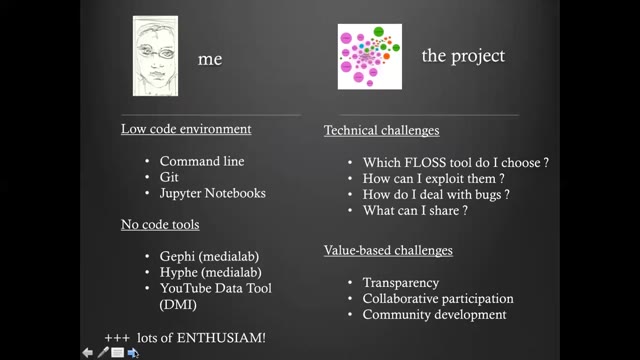
Implementing the project gave insight into what it takes for social scientists with minimal tech knowledge or exposure to open source values to practice open research with FLOSS tools. Three types of challenges are addressed: training, documenting, and collaborating. The speaker's user background: minimal experience with digital tools for research—only the basics of the terminal, version control with Git, and executing code in Jupyter notebooks, plus some no-code tools like Gephi, HIVE, and YouTube Data Tool, which they liked and were eager to do more of.
The speaker uses an opening anecdote to introduce the technical and value-based challenges of being a FLOSS tools user in a social science setting. On the technical side, the first challenge is that the speaker does not know how to code. This meant they did not exploit Torque to the fullest or use its Python library programmatically, and had to rely on a third party to build the network that was eventually imported into Gephi.
The second challenge was with the community detection calculation in Gephi, which gave a different result each time it was launched unless it was expressly told to always start with the same node in the network. Once this was realized, everything was written down in the project wiki, which led to an important lesson about documentation to be covered later. A main advantage of Gephi is its real-time visualization feature that lets you zoom in for high granularity, but the preview screen was blank—the third challenge. The bug fix found on the forum wasn't effective, so the separate preview tab was used to visualize the network as a whole and zoom in, though not as smoothly.
The bug fix found on the forum wasn't effective, but the separate preview tab allowed visualizing the network as a whole and zooming in, though not as smoothly. The bug was frustrating in the long run and led the team to explore other alternatives, including a different open source network visualization tool developed expressly for Twitter data called Twitter Explorer. Its advantage is being very user friendly, but in its early stages it lacked many functions Gephi provided—for instance, Twitter Explorer only has one layout option, whereas Gephi has several.
실제 예시: FOSDEM 2021 데모 강연(CC BY 2.0 BE) 노트. 장별로 하나의 강의록, 페이지마다 노트.
내보내기 형식
- Markdown
- .md. 페이지 이미지를 묶으면 notes.md와 images/ 폴더가 든 .zip.
- Word
- .docx. 페이지 이미지가 있으면 넣습니다.
- 이어지는 레이아웃. 필요하면 CJK 글꼴 일부를 넣습니다.
- 받아적기 .txt
- 문단으로 정리하고, [mm:ss] 시각은 선택 사항.
- 받아적기 .srt
- 받아적기 구간마다 자막 하나.
- 그 밖에
- 슬라이드를 내보내면 강의록이 각 페이지의 발표자 노트에 들어갑니다.
# Maya Anderson-González, FLOSS meets Social Science Research, FOSDEM 2021

Maya introduces her talk on how free/libre and open source software (FLOSS) meets social science research, opening with the quote often attributed to Henry Ford—"If I had asked people what they wanted, they would have said faster horses"—to illustrate users' inability to convey their needs to innovators. She notes this is the opposite of how open source development and open research grow: by valuing and promoting user feedback toward community-oriented goals.

## 0:38

The speaker introduces herself as Maya and says she will talk about how floss meets social science research and lives to tell the tale. She begins with a quote: if people had been asked what they wanted, they would have said faster horses.

## 0:53

The speaker introduces herself as Maya and frames the talk around how free/libre and open source software (floss) meets social science research. She opens with the quote often attributed to Henry Ford—"If I had asked people what they wanted, they would have said faster horses"—used to illustrate users' inability to convey their needs to innovators. She notes this is the opposite of how open source development and open research grow and improve: by valuing and promoting user feedback to reach community-oriented goals.

## 1:34

I'll share experiences as a user of FLOSS tools for open research in social science. Specifically, I'll talk about a team project I worked on to produce and analyze a Twitter follow graph of last year's FOSDEM and Chaos Con participants.


— CC BY 2.0 BE
발표자 노트 · 4:39
The speaker uses an opening anecdote to introduce the technical and value-based challenges of being a FLOSS tools user in a social science setting. On the technical side, the first challenge is that the speaker does not know how to code. This meant they did not exploit Torque to the fullest or use its Python library programmatically, and had to rely on a third party to build the network that was eventually imported into Gephi.
내보내기는 추가 요금이 없습니다. 강의록 실행에서 낸 비용이나 무료 횟수에 포함됩니다.
이런 곳에
강의
학기 강의 녹화가 페이지와 강의록이 되어 시험 전에 바로 복습할 수 있습니다.
회의
슬라이드가 많은 회의에서 페이지마다 말한 요점이 붙습니다.
YouTube와 온라인 강의
가진 파일을 씁니다. 탭에서만 재생되면 확장 프로그램으로 페이지를 읽습니다. 강의록에는 처리할 수 있는 소리가 필요합니다.
요금
- 강의록은 같은 잔액을 씁니다. 오디오 1분당 $0.01.
- 청구는 오디오 분 단위이며 1분 미만은 1분으로 계산합니다. 페이지 수는 요금에 영향을 주지 않습니다.
- 계정마다 3회까지 무료로 완료할 수 있습니다(각 30분·60페이지 이내).
- 요금은 완료됐을 때만 뺍니다. 실패하면 무료 횟수도 줄지 않고 요금도 없습니다.
- Lifetime의 $5도 같은 잔액에 들어갑니다. 충전은 결제 페이지에서 합니다.
- 한 번에 최대 300페이지, 180분, 오디오 128 MB입니다.
자주 묻는 질문
- 영상 파일이 기기 밖으로 나가나요?
- 아니요. 페이지는 브라우저에서 뽑고 영상 파일은 업로드하지 않습니다. 강의록을 시작하면 소리와, 페이지가 있을 때는 페이지 정지 이미지가 전송됩니다.
- 계정이 필요한가요?
- 네. 강의록은 로그인한 계정에서만 됩니다.
- 요금은 어떻게 되나요?
- 처음 3회는 무료로 완료할 수 있습니다(각 30분·60페이지 이내). 그다음은 오디오 1분당 $0.01을 공용 잔액에서 성공했을 때만 뺍니다.
- 받아적기를 내려받을 수 있나요?
- 네. 받아적기가 끝나면 내보내기 메뉴에 .txt와 .srt가 나옵니다.
- 브라우저 플레이어에서만 보는 영상은요?
- 확장 프로그램은 탭에서 페이지를 읽습니다. 강의록에는 처리할 수 있는 기기 안 소리가 필요합니다. 소리가 없으면 보낼 오디오가 없다고 화면에 알려 줍니다.
- 노트는 페이지 정지 이미지를 보고 쓰나요?
- 강의록은 받아적은 글에서 씁니다. 페이지가 있을 때는 페이지 정지 이미지도 받아적기와 함께 모델로 보냅니다. 내보낼 때 편집기에 있는 페이지 이미지를 붙일 수는 있습니다.