Une connexion est nécessaire pour générer des notes IA. Le fichier vidéo n’est pas envoyé ; au lancement des notes, le son et, quand la tâche a des pages, les images des pages sont envoyés.
Des notes sur chaque page d’un cours
Ouvrez un enregistrement, extrayez les pages, puis lancez les notes. Le cours devient un document par chapitres, avec des notes sur ce qui a été dit à chaque page. Les pages restent dans le navigateur. Le fichier vidéo n’est pas envoyé ; au lancement des notes, le son et, quand la tâche a des pages, les images des pages sont envoyés.
- Chaque page, ses notes
- Notes et transcription .txt/.srt
- 3 exécutions gratuites
Comment ça marche
Extrayez les pages dans le navigateur
Déposez un cours, une réunion ou un enregistrement d’écran. Si la vidéo ne se lit que dans un onglet, utilisez l’extension Chrome. Les pages sont trouvées sur votre appareil.
Lancez les notes
Confirmez l’avertissement : les règles du gratuit et du payant s’affichent avant. Le son part en premier et la transcription démarre aussitôt ; les images des pages suivent pour la rédaction. Le document est organisé par chapitres.
Relisez et exportez
Modifiez les notes dans le panneau et relisez-les en mode lecture. Exportez en Markdown, Word ou PDF avec les images de pages que vous avez, ou la transcription en .txt / .srt.
Ce que vous obtenez
 4:39
The speaker uses an opening anecdote to introduce the technical and value-based challenges of being a FLOSS tools user in a social science setting. On the technical side, the first challenge is that the speaker does not know how to code. This meant they did not exploit Torque to the fullest or use its Python library programmatically, and had to rely on a third party to build the network that was eventually imported into Gephi.
Résumé
Maya introduces her talk on how free/libre and open source software (FLOSS) meets social science research, opening with the quote often attributed to Henry Ford—"If I had asked people what they wanted, they would have said faster horses"—to illustrate users' inability to convey their needs to innovators. She notes this is the opposite of how open source development and open research grow: by valuing and promoting user feedback toward community-oriented goals.
The speaker introduces herself as Maya and says she will talk about how floss meets social science research and lives to tell the tale. She begins with a quote: if people had been asked what they wanted, they would have said faster horses.
The speaker introduces herself as Maya and frames the talk around how free/libre and open source software (floss) meets social science research. She opens with the quote often attributed to Henry Ford—"If I had asked people what they wanted, they would have said faster horses"—used to illustrate users' inability to convey their needs to innovators. She notes this is the opposite of how open source development and open research grow and improve: by valuing and promoting user feedback to reach community-oriented goals.
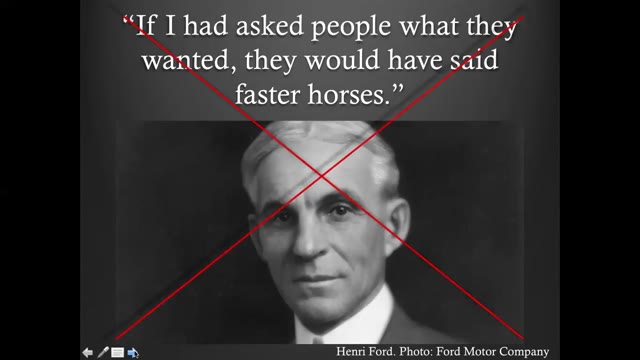
I'll share experiences as a user of FLOSS tools for open research in social science. Specifically, I'll talk about a team project I worked on to produce and analyze a Twitter follow graph of last year's FOSDEM and Chaos Con participants.
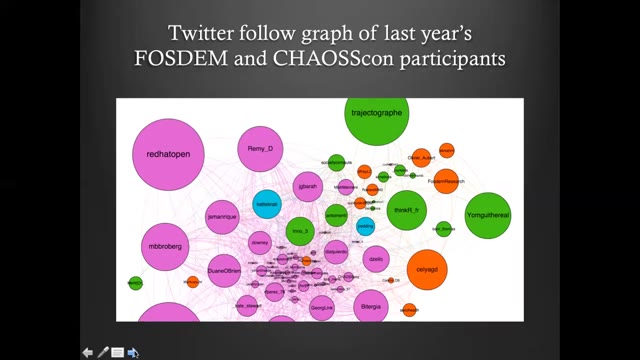
The speaker shares their experience as a user of FLOSS tools for open research in social science, focusing on a team project that produced and analyzed a Twitter follow graph of last year's FOSDEM and Chaos Con participants. The project used open source tools and agile management: data was collected with the command line tool Torque, network visualization was done with Gephi, and Framagit provided a collaborative framework for managing code, data, visualization, and text. Implementing the project led to insight about what it takes for social scientists with minimal tech knowledge or exposure to open source values to practice open research with FLOSS tools.
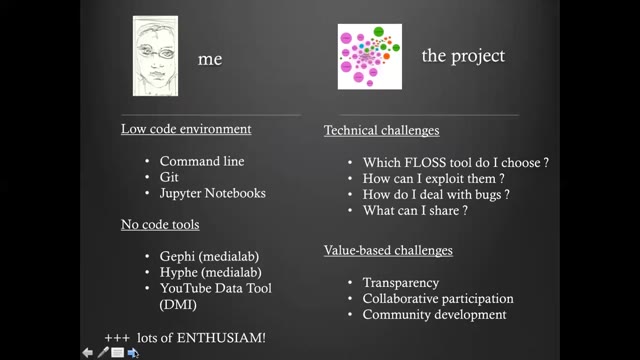
Implementing the project gave insight into what it takes for social scientists with minimal tech knowledge or exposure to open source values to practice open research with FLOSS tools. Three types of challenges are addressed: training, documenting, and collaborating. The speaker's user background: minimal experience with digital tools for research—only the basics of the terminal, version control with Git, and executing code in Jupyter notebooks, plus some no-code tools like Gephi, HIVE, and YouTube Data Tool, which they liked and were eager to do more of.
The speaker uses an opening anecdote to introduce the technical and value-based challenges of being a FLOSS tools user in a social science setting. On the technical side, the first challenge is that the speaker does not know how to code. This meant they did not exploit Torque to the fullest or use its Python library programmatically, and had to rely on a third party to build the network that was eventually imported into Gephi.
The second challenge was with the community detection calculation in Gephi, which gave a different result each time it was launched unless it was expressly told to always start with the same node in the network. Once this was realized, everything was written down in the project wiki, which led to an important lesson about documentation to be covered later. A main advantage of Gephi is its real-time visualization feature that lets you zoom in for high granularity, but the preview screen was blank—the third challenge. The bug fix found on the forum wasn't effective, so the separate preview tab was used to visualize the network as a whole and zoom in, though not as smoothly.
The bug fix found on the forum wasn't effective, but the separate preview tab allowed visualizing the network as a whole and zooming in, though not as smoothly. The bug was frustrating in the long run and led the team to explore other alternatives, including a different open source network visualization tool developed expressly for Twitter data called Twitter Explorer. Its advantage is being very user friendly, but in its early stages it lacked many functions Gephi provided—for instance, Twitter Explorer only has one layout option, whereas Gephi has several.
Exemple réel : notes du talk démo FOSDEM 2021 (CC BY 2.0 BE). Un document par chapitres, avec des notes sur chaque page.
Formats d’export
- Markdown
- .md, ou un .zip avec notes.md et un dossier images/ quand les images de pages sont jointes.
- Word
- .docx, avec les images de pages intégrées quand vous les avez.
- Mise en page continue. Un sous-ensemble de police CJK est inclus si nécessaire.
- Transcription .txt
- Des paragraphes, avec des horodatages [mm:ss] facultatifs.
- Transcription .srt
- Un sous-titre par segment de transcription.
- Aussi
- Les notes vont dans les notes du présentateur quand vous exportez la présentation.
# Maya Anderson-González, FLOSS meets Social Science Research, FOSDEM 2021

Maya introduces her talk on how free/libre and open source software (FLOSS) meets social science research, opening with the quote often attributed to Henry Ford—"If I had asked people what they wanted, they would have said faster horses"—to illustrate users' inability to convey their needs to innovators. She notes this is the opposite of how open source development and open research grow: by valuing and promoting user feedback toward community-oriented goals.

## 0:38

The speaker introduces herself as Maya and says she will talk about how floss meets social science research and lives to tell the tale. She begins with a quote: if people had been asked what they wanted, they would have said faster horses.

## 0:53

The speaker introduces herself as Maya and frames the talk around how free/libre and open source software (floss) meets social science research. She opens with the quote often attributed to Henry Ford—"If I had asked people what they wanted, they would have said faster horses"—used to illustrate users' inability to convey their needs to innovators. She notes this is the opposite of how open source development and open research grow and improve: by valuing and promoting user feedback to reach community-oriented goals.

## 1:34

I'll share experiences as a user of FLOSS tools for open research in social science. Specifically, I'll talk about a team project I worked on to produce and analyze a Twitter follow graph of last year's FOSDEM and Chaos Con participants.


— CC BY 2.0 BE
Notes du présentateur · 4:39
The speaker uses an opening anecdote to introduce the technical and value-based challenges of being a FLOSS tools user in a social science setting. On the technical side, the first challenge is that the speaker does not know how to code. This meant they did not exploit Torque to the fullest or use its Python library programmatically, and had to rely on a third party to build the network that was eventually imported into Gephi.
L’export ne coûte rien de plus. L’exécution des notes que vous avez payée, ou l’essai gratuit, le couvre.
Quand l’utiliser
Cours
Un enregistrement de cours devient des pages avec des notes à relire avant l’examen.
Réunions
Une réunion avec beaucoup de diapositives reçoit des notes sur chaque page, à côté de ce qui a été montré.
YouTube et cours en ligne
Utilisez un fichier local, ou l’extension quand la vidéo ne se lit que dans un onglet. Les notes ont toujours besoin du son d’un fichier que vous pouvez traiter.
Tarif
- Les notes utilisent le même solde. Une minute d’audio coûte 0,01 $.
- La facturation se fait à la minute d’audio, arrondie au supérieur. Le nombre de pages ne change pas le prix.
- 3 exécutions terminées gratuites par compte, de 30 minutes et 60 pages maximum chacune.
- Le débit n’a lieu qu’à la fin. Un échec ne consomme pas d’essai et ne coûte rien.
- Le crédit de 10 $ de l’offre Lifetime va sur le même solde. Rechargez depuis la page de facturation.
- Limites par exécution : 300 pages, 180 minutes et 95 Mo d’audio.
Questions
- Le fichier vidéo quitte-t-il mon appareil ?
- Non. Les pages sont extraites dans le navigateur et le fichier vidéo n’est pas envoyé. Au lancement des notes, le son et, quand la tâche a des pages, les images des pages sont envoyés.
- Faut-il un compte ?
- Oui. Les notes ne fonctionnent qu’avec un compte connecté.
- Comment suis-je facturé ?
- 3 exécutions terminées gratuites, de 30 minutes et 60 pages maximum. Ensuite, 0,01 $ par minute d’audio sur le solde partagé, seulement si l’exécution aboutit.
- Puis-je télécharger la transcription ?
- Oui. Quand la transcription est prête, le menu d’export propose .txt et .srt.
- Et si la vidéo ne se lit que dans un onglet ?
- L’extension lit les pages de l’onglet. Les notes ont toujours besoin du son d’un fichier local que vous pouvez traiter. Sans lui, le produit indique qu’il n’y a pas de son à envoyer.
- Les notes sont-elles écrites à partir des images des pages ?
- Le document est écrit à partir de la transcription et, quand la tâche a des pages, des images aussi. Les images vont au modèle avec la transcription. L’export peut aussi joindre les images que vous avez déjà dans l’éditeur.